The New Standard: Why Google Sheets Is Outperforming Excel
The New Standard: Why Google Sheets Is Outperforming Excel
For decades, Excel was the undisputed heavyweight champion of spreadsheets, designed as a desktop application for localized data processing. However, as work evolved toward cloud-based environments, instant collaboration, and AI integration, the landscape shifted. Google Sheets has transitioned from a lightweight web alternative into a robust powerhouse that now outperforms Excel for the vast majority of modern business requirements.
While Excel remains a powerful tool for accountants and finance bros (don’t @ me) running massive, offline financial models, Google Sheets is often the superior choice for dynamic teams. This breakdown explores why Sheets is pulling ahead, specifically through its frictionless collaboration, deep AI integration, and advanced automation capabilities.
1. Collaboration That Actually Works (and Doesn’t Break)
Collaborating in Excel can often be cumbersome. Originally built for offline desktops and later adapted for the cloud via OneDrive, co-authoring frequently feels clunky. Users often encounter version control errors, locked cells, or frustrating synchronization conflicts that disrupt productivity.
Conversely, Google Sheets is a cloud-native platform built for teamwork from its inception. It supports dozens of simultaneous editors across various devices, including Macs, PCs, and mobile platforms, with changes appearing instantly and reliably.
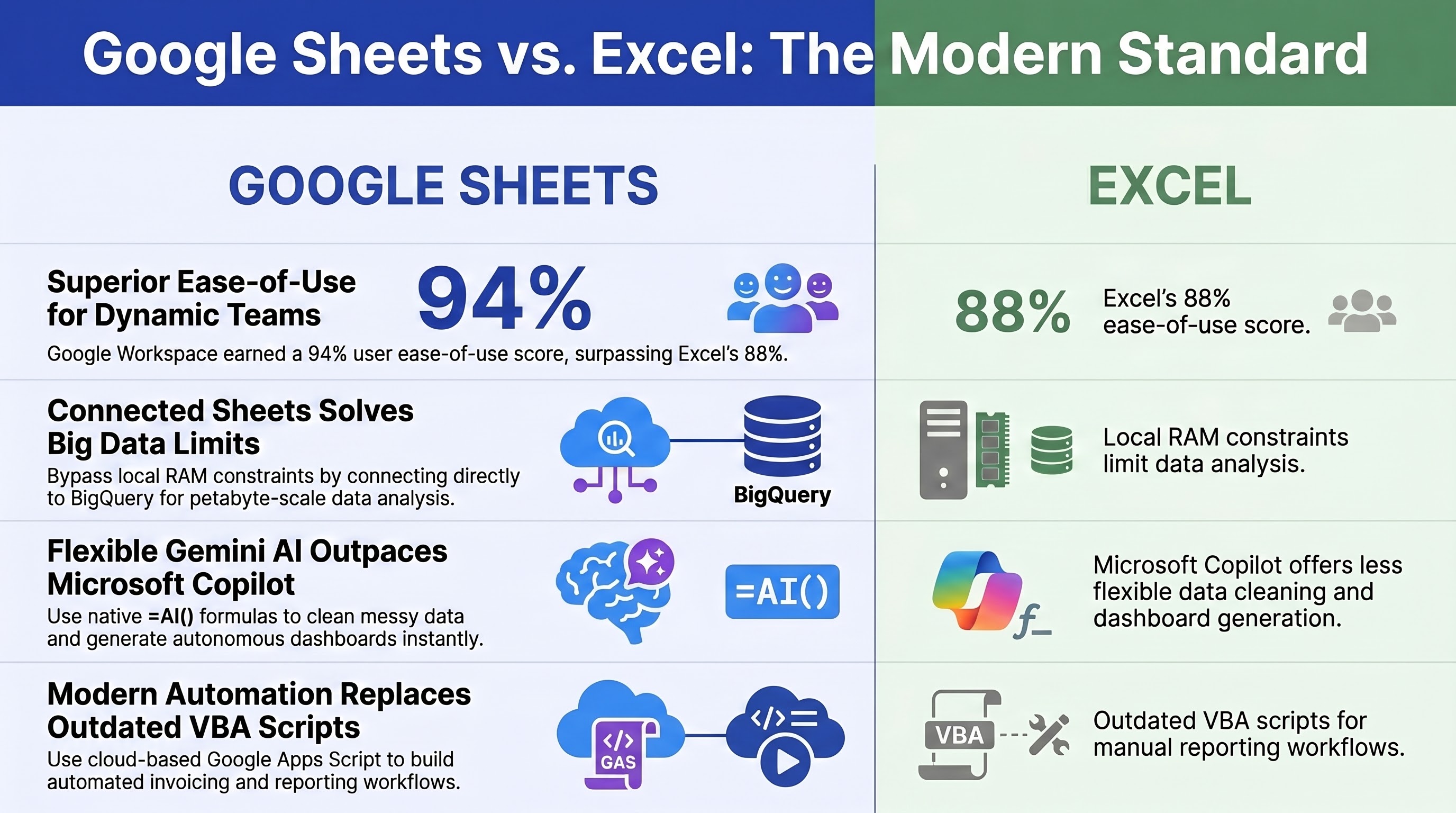
The numbers back this up: recent G2 software reviews show Google Workspace hitting a 94% user ease-of-use score, compared to Excel’s 88%. (G2 Software Reviews)
2. Big Data? Meet “Connected Sheets”
Historically, critics argued that Google Sheets couldn’t handle large datasets compared to Excel’s million-row capacity. In the past, loading excessive data would indeed cause browser performance issues. However, Google neutralized this limitation with Connected Sheets.
Connected Sheets bypasses local RAM constraints by connecting spreadsheets directly to BigQuery in Google Cloud. This allows your petabyte-scale data to remain in the cloud warehouse while you use Sheets as a high-performance dashboard to build pivot tables, charts, and formulas based on that massive data source.
This approach eliminates the need for giant CSV exports and provides a single, live source of truth that won’t crash your browser.
3. Gemini AI: Your Built-In Data Analyst
Artificial Intelligence is where Google Sheets truly distinguishes itself. While Microsoft has integrated Copilot into Excel, it often requires data to be perfectly formatted into official table objects. It frequently struggles with the unstructured or messy data dumps that are common in everyday business.
Google’s Gemini in Sheets is much more flexible and seamlessly integrated into your workflow. Here is what makes it so powerful:
- Built-in AI Formulas: You can utilize functions like =AI() or =Gemini() directly within cells, transforming your spreadsheet into a reasoning engine. These formulas are ideal for analyzing sentiment in survey responses, categorizing large volumes of text, or cleaning inconsistent formatting that would otherwise require manual labor. Because these functions run natively, they can be easily scaled across thousands of rows to process datasets in seconds.
- The Smart Side-Panel: Gemini acts as an embedded analyst, autonomously building charts, generating custom dashboards on separate tabs from specific columns of data, and drafting complex optimization formulas. It leverages the Google ecosystem to pull context from Gmail and Drive, allowing you to synthesize information across platforms without leaving your spreadsheet.
- Predictive Smart Fill: As you enter data, Gemini recognizes patterns and fills the remainder of the column automatically. This proactive feature detects user intent to help maintain consistent and clean data across your workbooks, ensuring information is properly categorized with minimal manual effort.
4. Google Apps Script: Leaving VBA in the 90s
Automating Excel traditionally requires VBA (Visual Basic for Applications), a language often limited by localized desktop architecture. It can be prone to breaking, lacks compatibility with Macs, and generally fails to function on the web version of Excel.
Google Sheets utilizes Google Apps Script, which is based on JavaScript and runs entirely in the cloud. This allows your spreadsheet to function as a serverless engine for business processes. If you are not comfortable writing JavaScript or Google Apps Script yourself, Gemini can generate the code for you. As the saying goes, when exploring what is possible in Sheets, we are only limited by our imagination.
Since Apps Script is natively integrated with Google Workspace, you can easily create scripts to read data, generate customized documents, and automate communications, allowing for complex workflows without manual intervention.
5. Real-World Magic: Use Cases You Can Build Today
What does all this power look like in the real world? Here are a few ways businesses are using Google Sheets and Apps Script to build free, automated workflows:
- Automated Status Reporting: Using Apps Script, you can compile data from multiple sources into a comprehensive daily digest. This allows stakeholders to receive a summarized report via email each morning, ensuring everyone stays informed without needing to manually aggregate information.
- Automated Invoicing: You can set up a Google Sheet containing your customer orders. A script runs daily, injects that data into an invoice template, exports it as a PDF, saves it to a Google Drive folder, and emails it to the customer.
- Resource Request Tracking: You can build a streamlined intake system where form submissions are automatically logged to a central sheet. A script then triggers an instant notification to the relevant parties, providing a transparent and efficient way to manage and track requests throughout their lifecycle.
The Bottom Line
Microsoft Excel will always have a place for isolated, intensely complex financial modeling. However, for the modern, agile business that values seamless collaboration, easy access to big data, flexible AI, and cloud-based automation, Google Sheets is the undeniable winner.
Filed under